
Defect management app: defects linked to photos and plans
When construction teams need answers, they need the full picture. In kontekst, photos and notes are linked directly to each defect or task, and the defect is pinned on the plan.
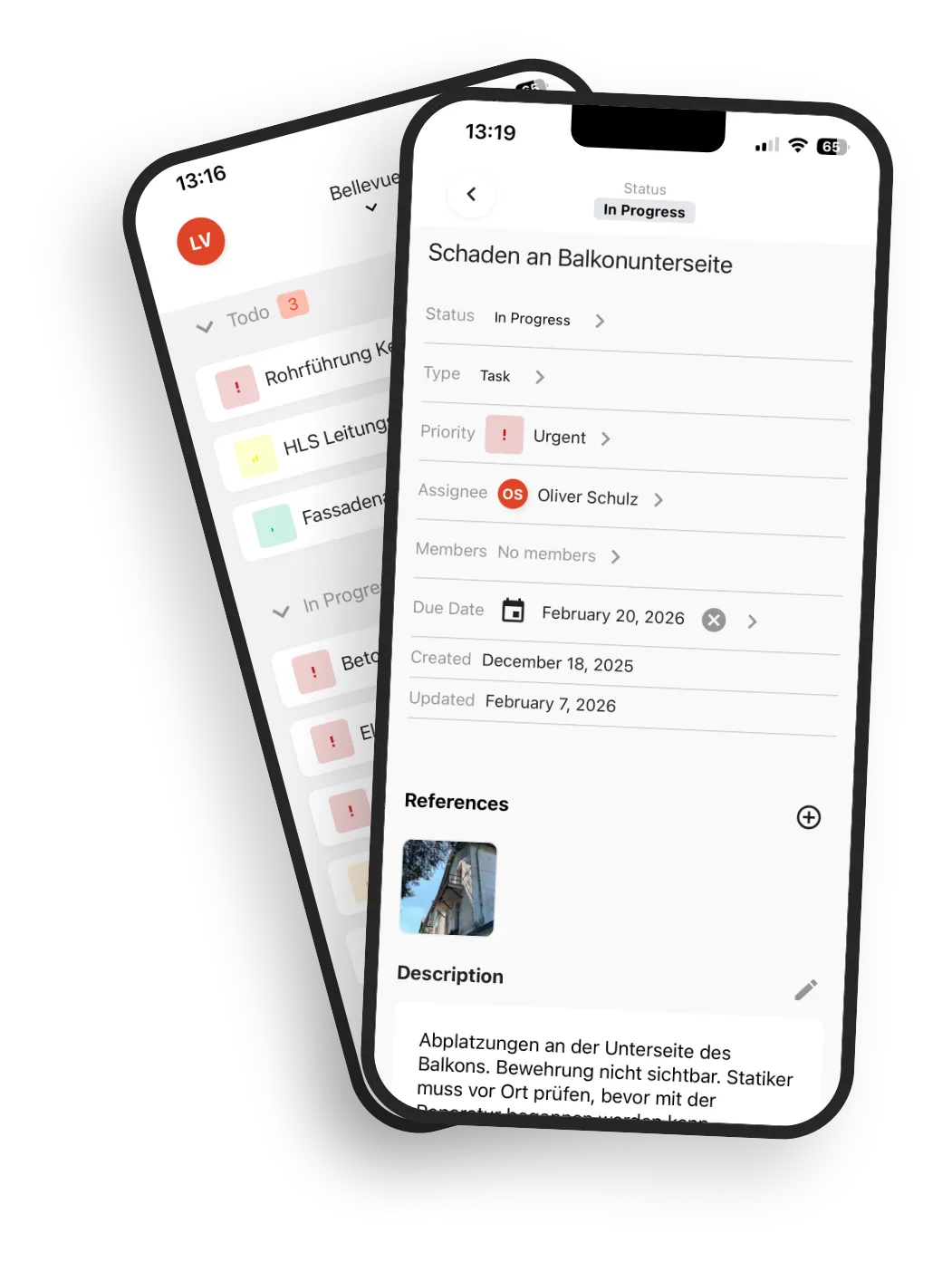
Defects are captured, but context is scattered
The defect was logged, a photo sent in chat, a note added in a protocol. As soon as someone asks for status, people start searching across folders, inboxes, and messages.
Time lost on every follow-up
Which photos belong to this defect, who approved what, what is already resolved. Too much time is spent reconstructing context.
Disconnected tools
Defect lists, photo storage, and protocols live in different systems, so no one sees the full trail in one view.
Uncertain decisions
Without complete context, teams prioritize incorrectly or trigger duplicate work.
Office rework
Assigning photos, rebuilding histories, and putting reports together by hand: after every site walk, the work continues in the office.
Unclear handover to subcontractors
Tasks are passed on, but without the full context. That leads to follow-up questions and delays.
The issue is usually not missing documentation. The issue is missing links between existing information.
How defect management works in kontekst
A defect or task bundles one process and everything tied to it. In the app they are called Topics. Instead of collecting attachments, your team links context in one working thread.
Capture on site
Create a defect, link photos to it, add the first assessment. Works offline in the app and syncs automatically later.
Link context
Link more photos, notes, and tasks to the defect and pin the defect on the plan. Each element stays findable on its own.
Clarify, assign, close
Status, assignee, and due date are visible to everyone. For handover and evidence, you have everything at hand.
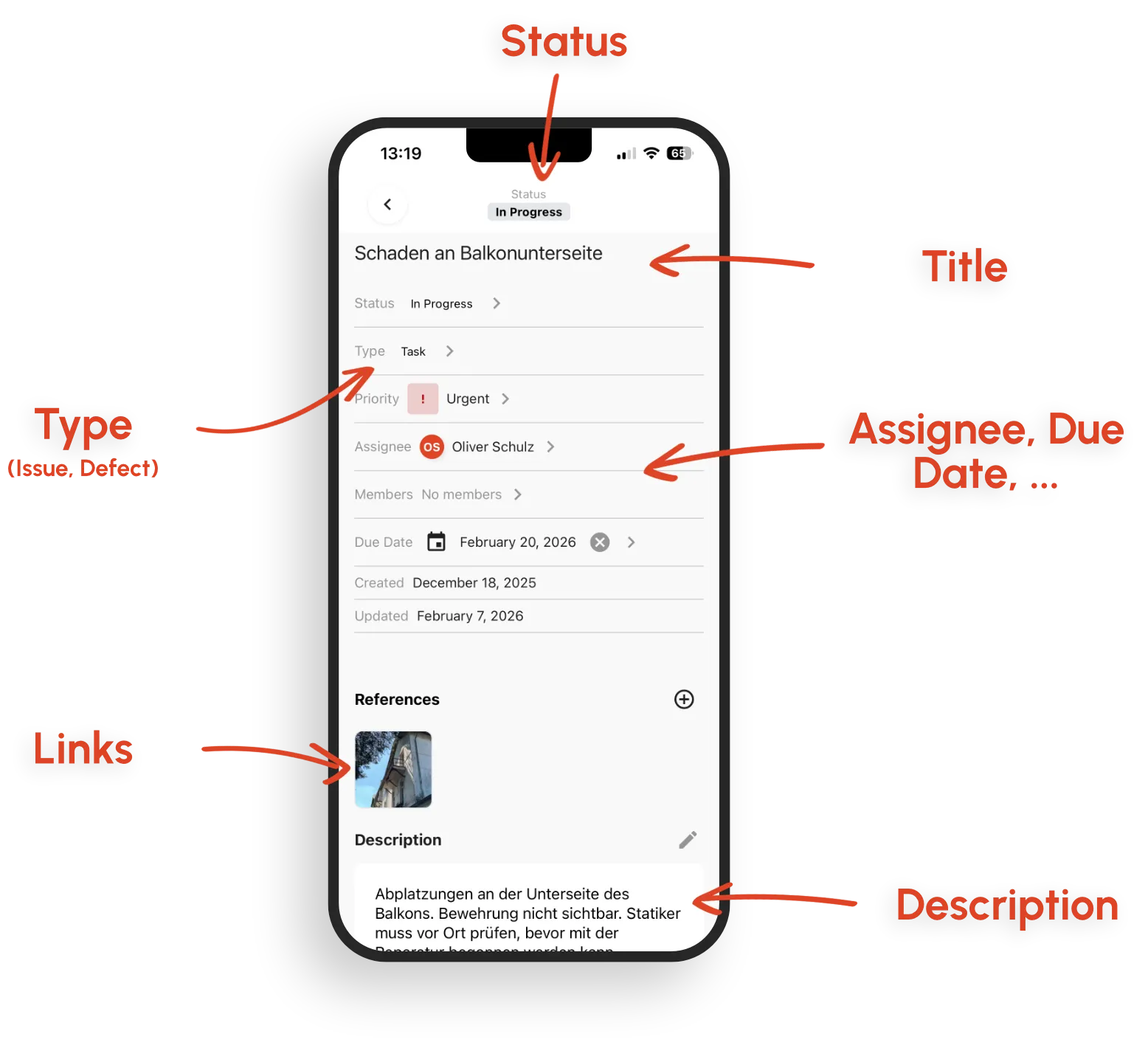
Features for fast defect resolution
All the tools for one continuous workflow from capture to closure, in one workspace.
Linking in both directions
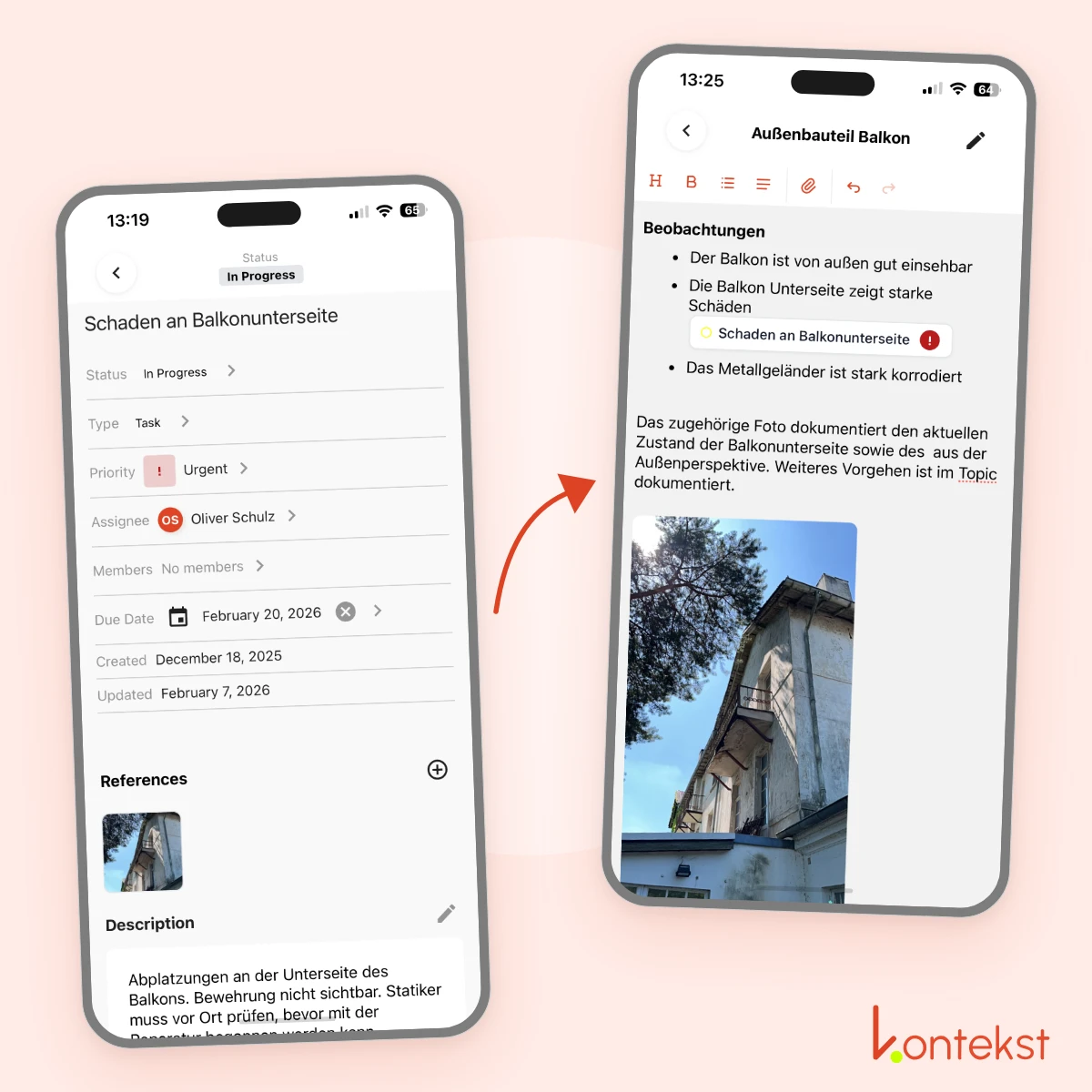
Link one photo to multiple defects without copying it. From defect to photo, from photo to note, from note to task, and back.
Structured defects and tasks
Each defect is a clear workflow item with status, priority, assignee, and due date.
Offline on site
Capture and document in the app without signal, then sync automatically once connected.
Kanban and list views
In the browser, grouped by status, order by drag and drop. In the app, filter the list by status, priority, assignee, and due date.
Subcontractor coordination
Invite subcontractors as team members or send them a defect by email from the app.
Search and filter
Search defects by title and description in the browser, filter them in the app by status, priority, assignee, and due date. From the photos of a room, you get to the linked defect.
PDF reports from the browser
Export the defect list as a PDF report. Photos go into a separate PDF photo report.
Traceable history
Photos carry capture date and person, and every defect shows its status and assignee. What was documented when stays traceable.
Navigate instead of searching: everything linked
From defect to photo, from photo to note, and back. In any direction, without digging through folders. The plan shows where defects and photos are located.
One photo, multiple defects
No duplicates, no copying.
Complete context
All linked elements immediately visible.
Status of each defect
From creation to completion.
What connected defect management delivers
Less coordination overhead, clear decisions, and stronger documentation during project execution and handover.
Resolve follow-ups directly
All relevant context is linked to the defect, so teams stop piecing information together manually.
Decide with full context
You see the full trail before assigning work, changing priorities, or approving closure.
Stronger evidence for handover and warranty
A clear history reduces disputes in critical project phases.
Pass defects on to subcontractors
Send a defect with its linked photos by email from the app. Or invite the subcontractor as a team member. There is no guest access.
Less post-processing
Reports are generated from existing project data instead of manual office reconstruction.
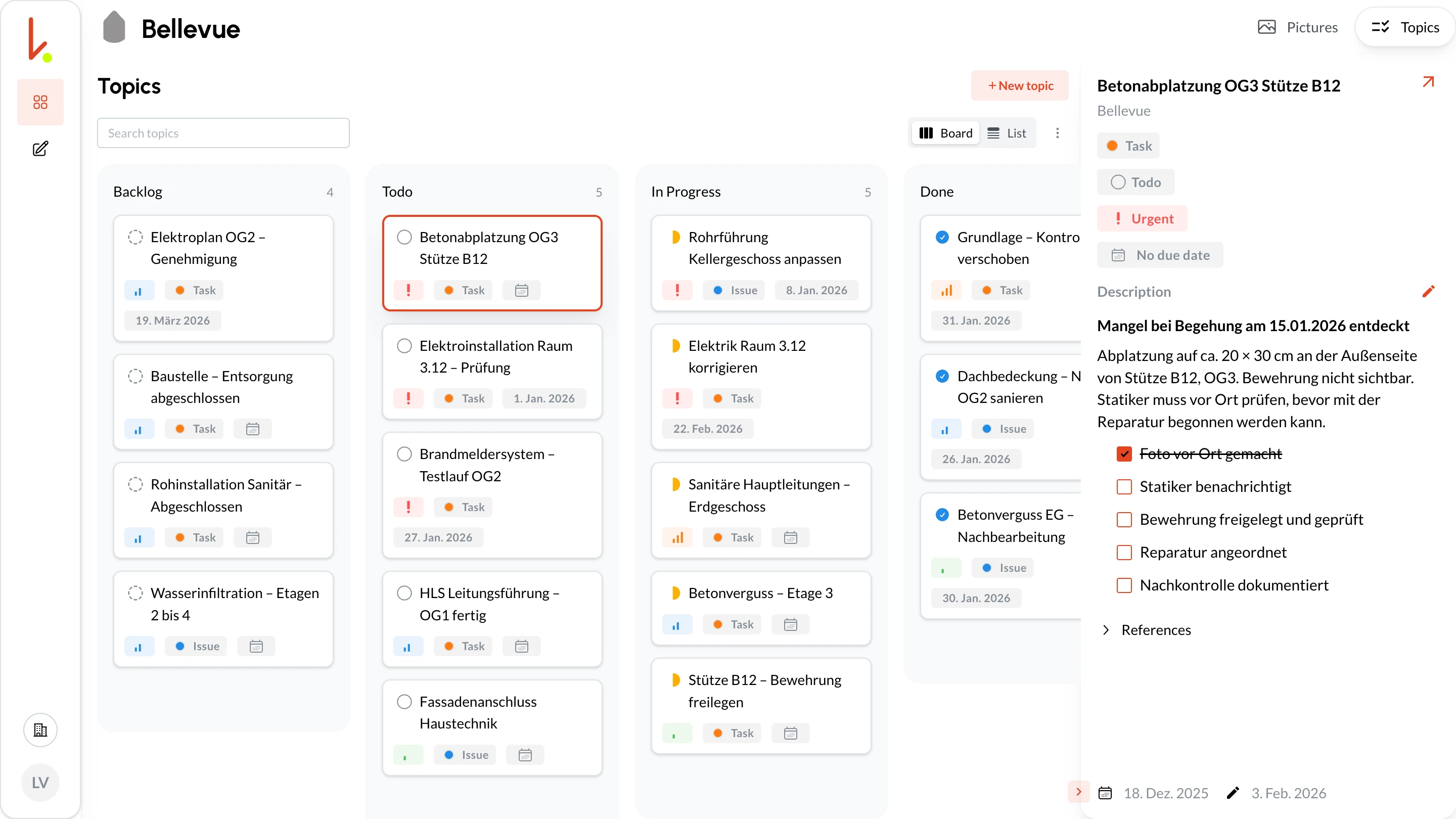
Kanban board and list view: full overview
See all defects as a Kanban board or list, with status, priority, assignee and due date.
Drag and drop
Change status by drag and drop.
Grouped by status
Order by drag and drop. In the app, filter by priority, assignee and due date.
PDF report
Start the defect list PDF report in the browser. It arrives by email.
Typical construction and handover scenarios
Three cases where having the context at hand makes the difference.
Site manager: from defect to traceable history
Concrete damage on column B12 discovered, defect created, photo linked. Note added: 'Consulted structural engineer 15/01, reinforcement exposed, no load-bearing risk.' After repair, new photo linked. Three weeks later the subcontractor asks for details, and the complete history is right there on the defect.
Architect: coordination across trades and months
Multiple inspections, photos, and decisions are linked in one defect or task, ready for coordination meetings.
Handover: prove open items clearly
Each item includes before/after photos, notes, and current status, so you go into acceptance well prepared.
Why kontekst works differently in defect workflows
When photos only hang off an entry as file attachments, they are hard to find outside that entry. kontekst links independent records, so your team navigates context instead of hunting for it.
Linking instead of file attachments
A photo stays findable through the filters and can be linked to several items without duplicates.
Navigation in any direction
Jump directly between defect, photo, note, and follow-up task.
Context at the point of work
Photos carry room, storey, and tags, not just free text. Defects are pinned on the plan.
One workflow, fewer tool switches
Capture, coordinate, and close in one system instead of fragmented silos.
Frequently Asked Questions
Can I try the defect management app for free?
Which app captures defects on site and tracks their status?
Can I create a defect list in the app and export it as a PDF?
When is it worth switching from Excel to defect management software?
What is digital defect management?
How do I create a digital defect list?
Does the defect management app work offline?
Can I link defects with photos and plans?
Is kontekst suitable for construction handover?
How is kontekst different from a defect list with file attachments?
Ready for defect management with context?
Run your next project with linked defect workflows from first capture to final closure.