
kontekst
v1.9.0
All releases

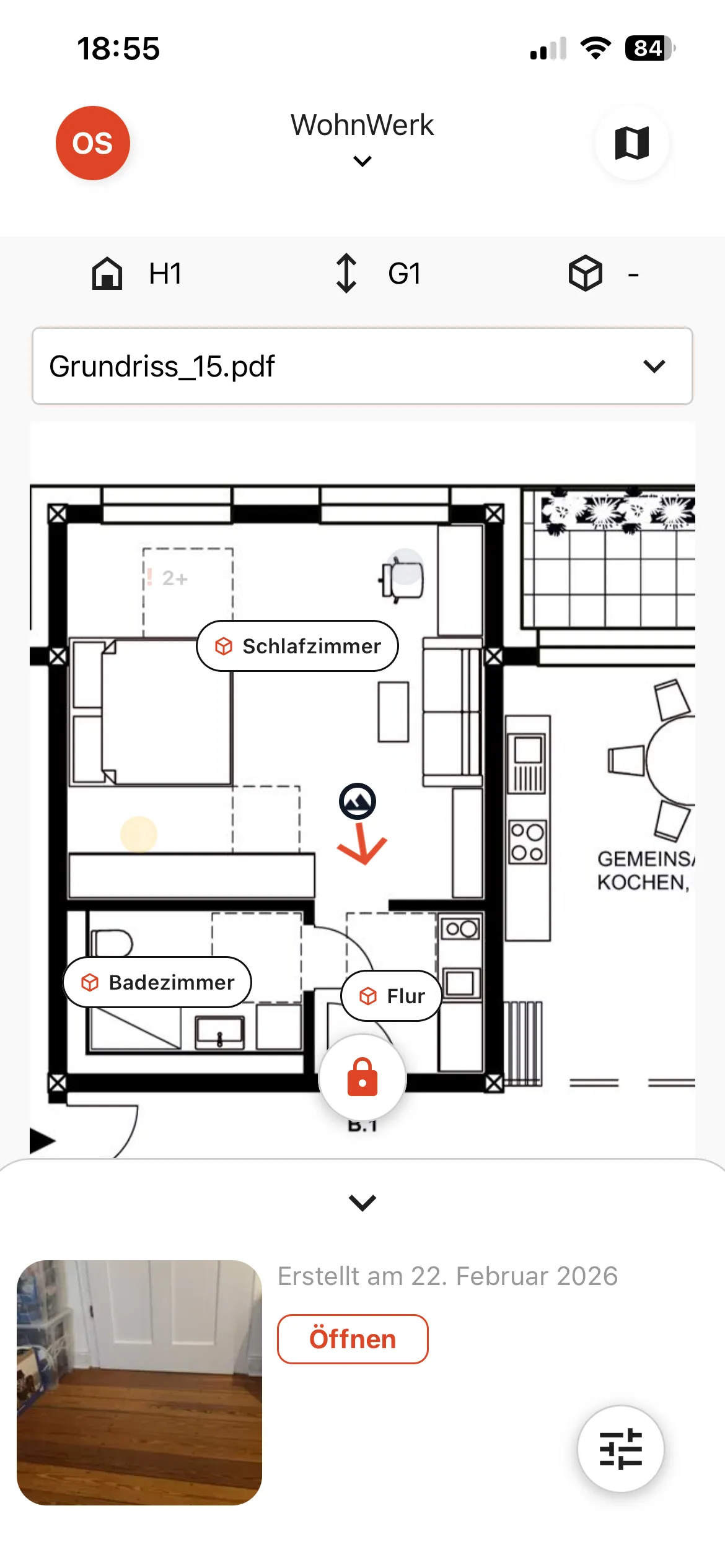
Plan View: Locate Photos and Topics on the Floor Plan

Version 1.9.0 introduces the Plan View: upload a floor plan and see exactly where photos and topics are located. Tap any spot on the plan to start documenting from that position and get a spatial overview of your entire site at a glance.

New Features Improvements Bug Fixes
Feature spotlight

See your site in 2D — everything in place

The Plan View puts all your photos and topics on the floor plan. See at a glance what has been documented where, tap any location to start documenting from there, and navigate the full site context without searching.

  • See all photos and topics located directly on the floor plan.
  • Tap any point on the plan to create a photo or note from that exact spot.
  • Get a spatial overview of your entire project documentation at a glance.
Screenshot of the Plan View showing photos and topics located on a floor plan in kontekst

New Features

  • Plan View
    Upload a floor plan and see all photos and topics placed directly on it. Tap any location on the plan to create a photo or note from that exact spot. This gives you a spatial overview of the entire site and makes it immediately clear what has been documented where — without searching through lists.

Improvements

  • Report Emails with Document Link
    When a report is ready, the notification email now includes a direct link to the generated document. No need to open the app separately to find the report.

Bugfixes

  • Location Filter in Reports
    Fixed a bug in the location filter for report generation.